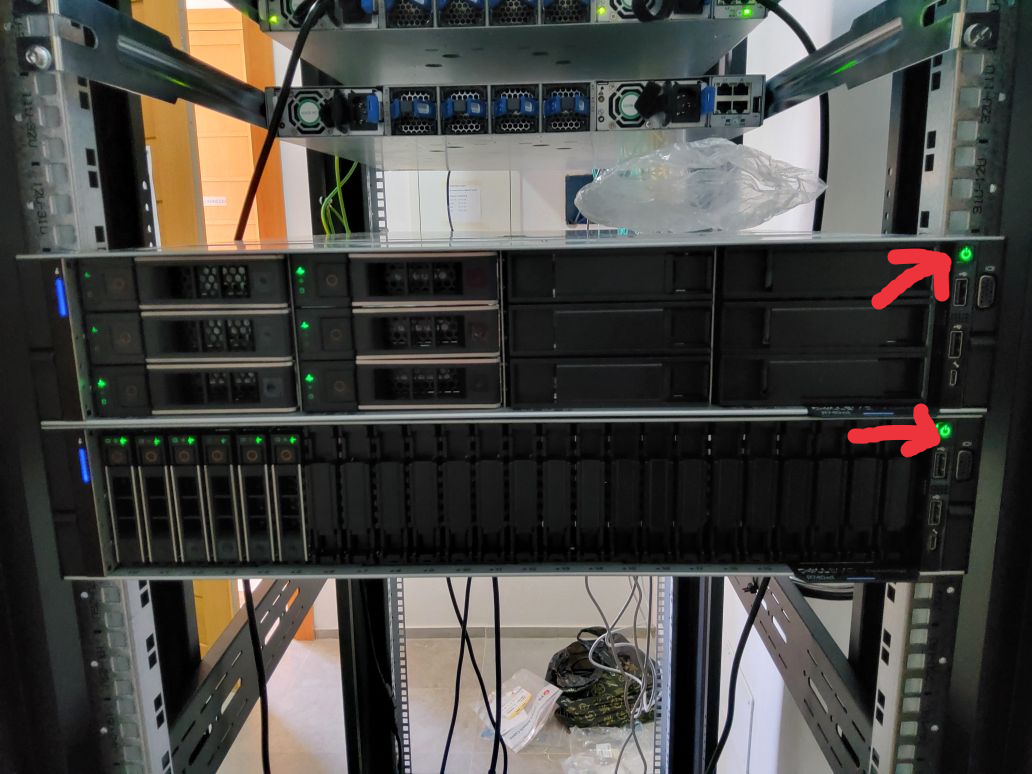
Poweroff servers - main rack Tunis
Emergency Procedure: Server Shutdown During Power Outage
Note: UPS power button is on the right of the screen
1. Blackout Detection
-
Signs:
- Lights off in the server room.
- Monitoring system alerts (Gotify/Mail).
-
Immediate Action:
- Do not manually shut down servers unless power is confirmed out for >5 minutes.
2. Access the Server Room
- Reach the server room within 5 minutes (4th floor) with:
- flashlight.
- Access keys (verify availability).
3. Execute Shutdown Sequence
⚠️ Critical: Follow the correct order to prevent data loss!
| Step | Action | Notes |
|---|---|---|
| 1 | Verify UPS status (press 1 time power button). | Ensure UPS is operational (battery charged). |
| 2 | Shut down critical servers (e.g., databases). | Use shutdown command or physical button. |
| 3 | Monitor shutdown completion. | Confirm all servers power off safely. |
| 4 | Report the incident. | Notify IT/DevOps team; log the event. |
4. Post-Shutdown
-
UPS Check:
- Verify battery charge (if outage persists).
- Do not restart servers until power is stable.
-
Restore Power:
- Power on servers.
- Verify service stability before resuming operations.
What NOT to Do
❌ Forcefully unplug servers (use proper shutdown commands). ❌ Ignore UPS alarms (may indicate battery issues). ❌ Fail to document the event (critical for future analysis).
Quick Checklist
[□] Blackout detected. [□] Server room accessed within 5 minutes. [□] UPS operational (battery charged). [□] Servers shut down.. [□] Incident reported and logged.
Poweroff button