
CI/CD
CI
Runner
# TODO
Registry
È importante abilitare il container registry a meno che non si voglia utilizzare strumenti come Harbor o similari, vedere le info generali per l'abilitazione del registry.
Token
Nel singolo progetto è necessario creare un token di accesso alla repo (ci serve per accedere al container registry)
Impostare i permessi come segue e assegnare un nome significativo e senza spazzi (CI-infratel_be) va benissimo
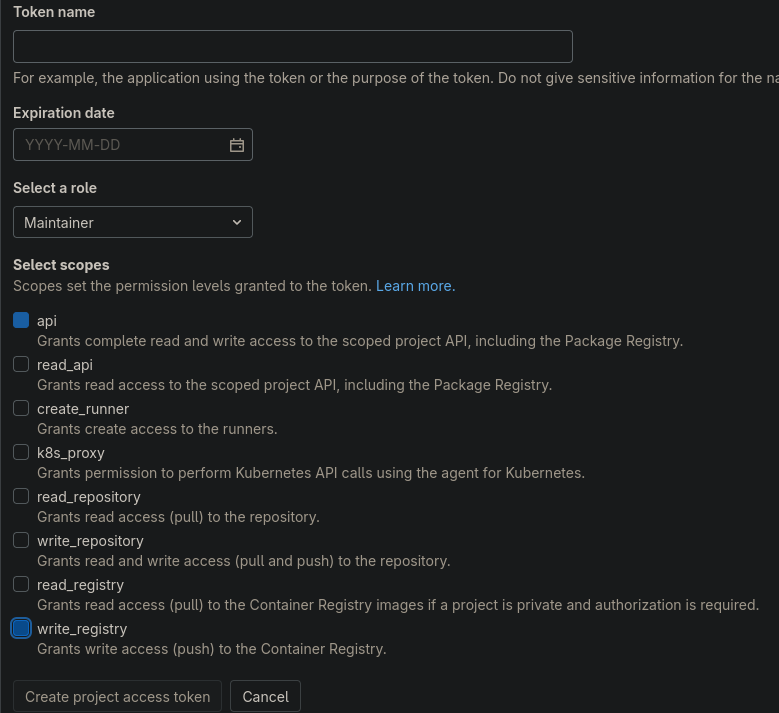
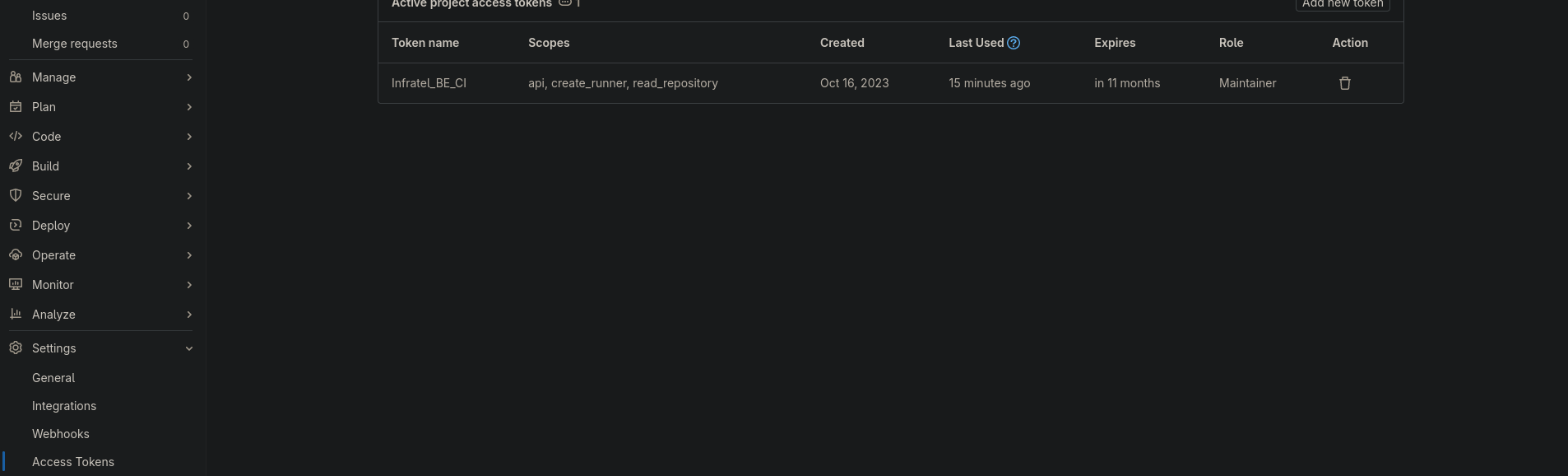
Copiare e salvare il token, poi la finestra dovrebbe apparire così
Variables
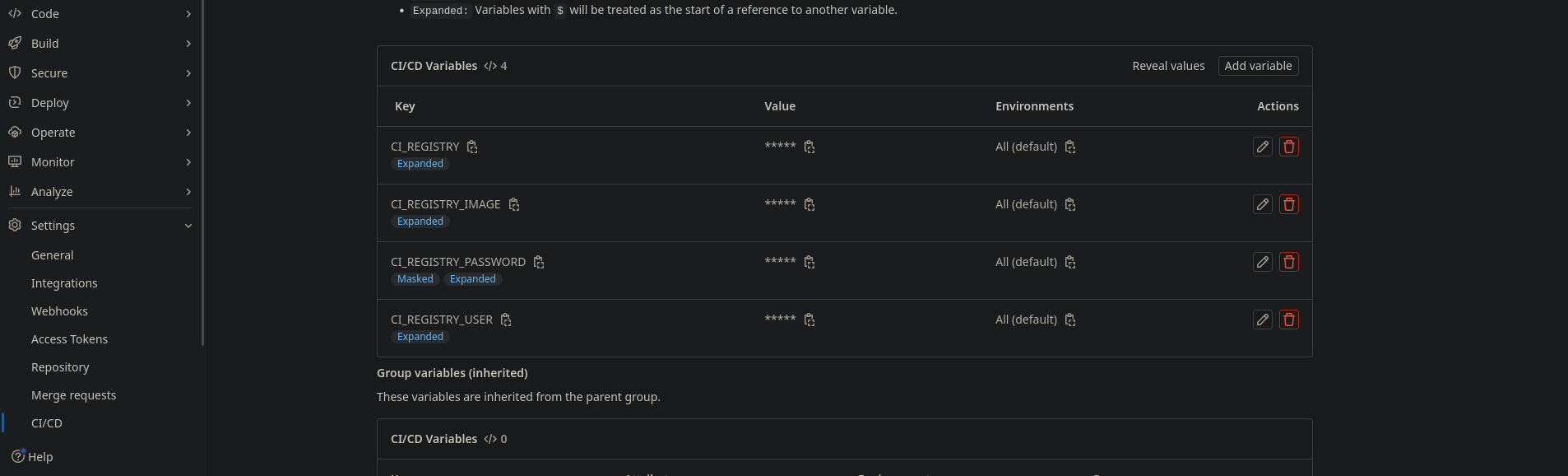
Le variabili da impostare sono le seguenti (prendiamo per esempio questo url gitlab.eagleprojects.cloud/web-eagle/infratel_be)
CI_REGISTRY: gitlab-registry.eagleprojects.cloud/web-eagle
CI_REGISTRY_IMAGE: infratel_be
CI_REGISTRY_PASSWORD: il token geenrato prima (deve essere mascherata)
CI_REGISTRY_USER: il nome che abbiamo dato al token
File
creare il file .gitlab-ci.yml
variables:
  DOCKER_TLS_CERTDIR: "/certs"


stages:
  - build
  - build_test


build_image_test:
  stage: build_test
  image: docker
  services:
    - docker:dind
  before_script:
    - echo $CI_REGISTRY_PASSWORD | docker login -u $CI_REGISTRY_USER $CI_REGISTRY --password-stdin
  script:
    - docker build -t $CI_REGISTRY/$CI_REGISTRY_IMAGE:test-$CI_COMMIT_TITLE -t $CI_REGISTRY/$CI_REGISTRY_IMAGE:test-latest .
    - docker push $CI_REGISTRY/$CI_REGISTRY_IMAGE:test-$CI_COMMIT_TITLE
    - docker push $CI_REGISTRY/$CI_REGISTRY_IMAGE:test-latest
    - docker logout
  only:
    - collaudo


build_image_prod:
  stage: build
  image: docker
  services:
    - docker:dind
  before_script:
    - echo $CI_REGISTRY_PASSWORD | docker login -u $CI_REGISTRY_USER $CI_REGISTRY --password-stdin
  script:
    - docker build -t $CI_REGISTRY/$CI_REGISTRY_IMAGE:$CI_COMMIT_TITLE -t $CI_REGISTRY/$CI_REGISTRY_IMAGE:latest .
    - docker push $CI_REGISTRY/$CI_REGISTRY_IMAGE:$CI_COMMIT_TITLE
    - docker push $CI_REGISTRY/$CI_REGISTRY_IMAGE:latest
    - docker logout
  only:
    - master
Gli stages sono gli step
only sono (if nome repo == ...)
servizio deve essere dind (docker in docker) se no non riesci a buildare il container
il before script serve per fare il login nel docker registry (in questo caso sempre su gitlab ma con url diversa)
lo scirpt builda il docker e lo pusha sul registry
In questo esempio manca la parte di testing
Runner
Debian
# TODO
Docker
# TODO
CD
In teoria, nella pratica ancora non funziona
File
https://gitlab.com/gitlab-examples/ops/gitops-demo/k8s-agents
nella cartella: .gitlab/agents/<nome agente>, aggiungere il file config.yaml
gitops:
  # Manifest projects are watched by the agent. Whenever a project changes,
  # GitLab deploys the changes using the agent.
  manifest_projects:
    # No authentication mechanisms are currently supported.
    # The `id` is a path to a Git repository with Kubernetes resource definitions
    # in YAML or JSON format.
  - id: web-eagle/infratel-kube/-/edit/main
    # Namespace to use if not set explicitly in object manifest.
    # Also used for inventory ConfigMap objects.
    default_namespace: default
    # Paths inside of the repository to scan for manifest files.
    # Directories with names starting with a dot are ignored.
    paths:
      # Read all .yaml files from team1/app1 directory.
      # See https://github.com/bmatcuk/doublestar#about and
      # https://pkg.go.dev/github.com/bmatcuk/doublestar/v2#Match for globbing rules.
    - glob: '/manifests/**/*.yaml'
    # Reconcile timeout defines whether the applier should wait
    # until all applied resources have been reconciled, and if so,
    # how long to wait.
    reconcile_timeout: 3600s # 1 hour by default
    # Dry run strategy defines whether changes should actually be performed,
    # or if it is just talk and no action.
    # https://github.com/kubernetes-sigs/cli-utils/blob/d6968048dcd80b1c7b55d9e4f31fc25f71c9b490/pkg/common/common.go#L68-L89
    # Can be: none, client, server
    dry_run_strategy: none # 'none' by default
    # Prune defines whether pruning of previously applied
    # objects should happen after apply.
    prune: true # enabled by default
    # Prune timeout defines whether we should wait for all resources
    # to be fully deleted after pruning, and if so, how long we should
    # wait.
    prune_timeout: 3600s # 1 hour by default
    # Prune propagation policy defines the deletion propagation policy
    # that should be used for pruning.
    # https://github.com/kubernetes/apimachinery/blob/44113beed5d39f1b261a12ec398a356e02358307/pkg/apis/meta/v1/types.go#L456-L470
    # Can be: orphan, background, foreground
    prune_propagation_policy: foreground # 'foreground' by default
    # Inventory policy defines if an inventory object can take over
    # objects that belong to another inventory object or don't
    # belong to any inventory object.
    # This is done by determining if the apply/prune operation
    # can go through for a resource based on the comparison
    # the inventory-id value in the package and the owning-inventory
    # annotation (config.k8s.io/owning-inventory) in the live object.
    # https://github.com/kubernetes-sigs/cli-utils/blob/d6968048dcd80b1c7b55d9e4f31fc25f71c9b490/pkg/inventory/policy.go#L12-L66
    # Can be: must_match, adopt_if_no_inventory, adopt_all
    inventory_policy: must_match # 'must_match' by default
Definizione agente
Dalla repo della CD
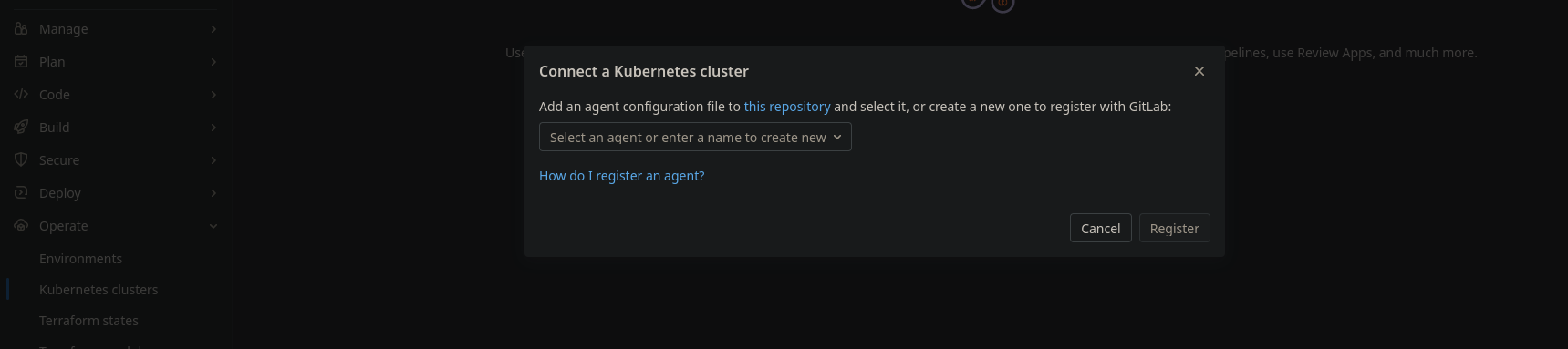
Selezionare l'agente che avrà nome, come il nome della cartella
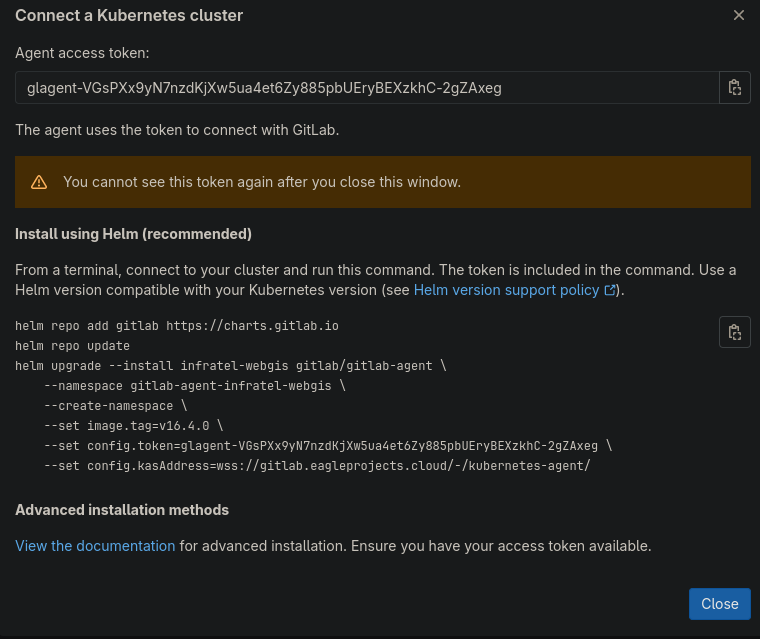
dare i comandi helm suggeriti nel cluster di riferimento