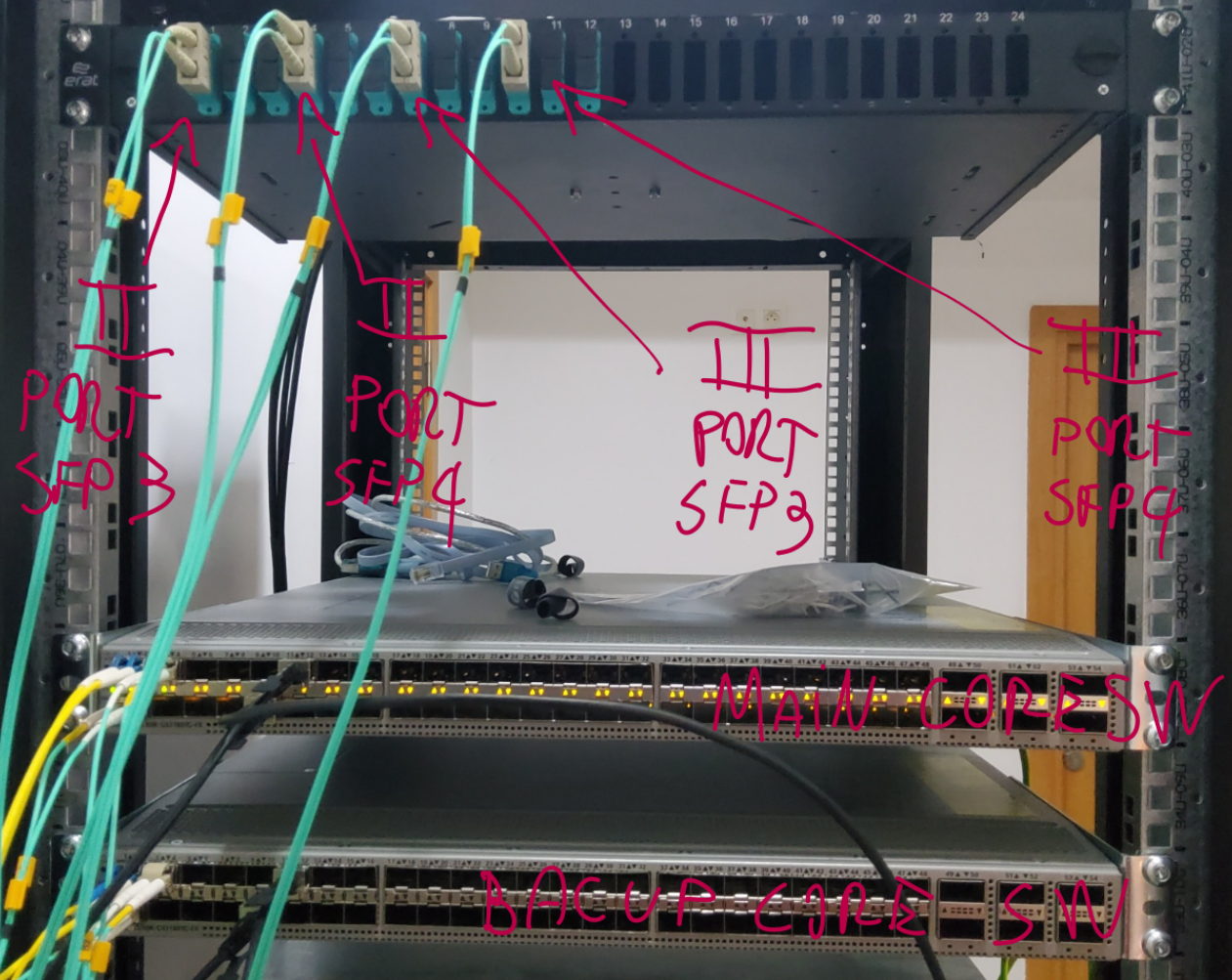
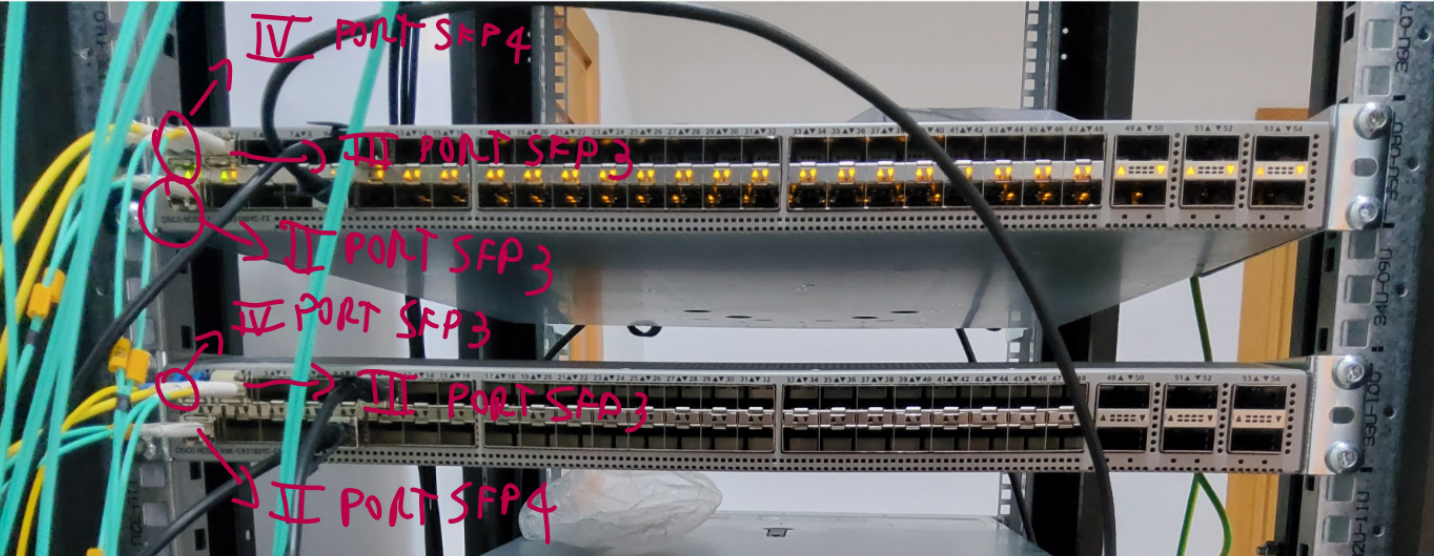
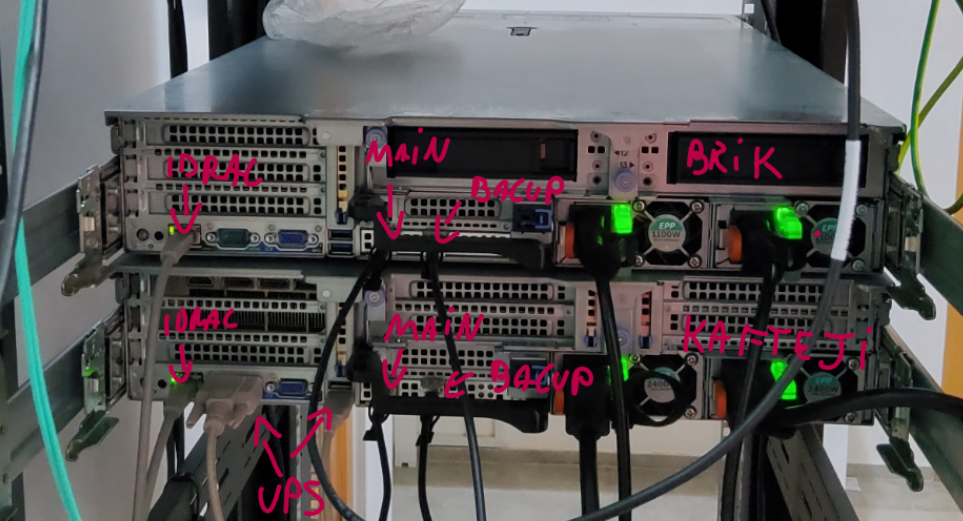
Architecture
network configuraton
Schema logico
                         +----------------------+
                         |       FIREWALL       |
                         | VLAN 114: 192.168.114.1
                         | VLAN 115: 192.168.115.1
                         +----------+-----------+
                                    |
                             sw3 porta Gi1/0/23
                                    |
                              Trunk VLAN 114,115
                                    |
                             +------+------+
                             |     sw3     |
                             +------+------+
                                    |
                              10 Gb / trunk
                                    |
                         +----------+-----------+
                         |   NEXUS CORE         |
                         | 192.168.115.101/24   |
                         +----+------------+-----+
                              |            |
                         10 Gb|            |10 Gb
                              |            |
                            sw2            sw4
Prima del collegamento del Nexus, gli switch possono essere collegati tra loro tramite trunk, ad esempio:
sw2 -------- sw3 -------- sw4
VLAN
| VLAN | Nome | Rete | Gateway | Utilizzo |
|---|---|---|---|---|
| 114 | USERS_114 |
192.168.114.0/24 |
192.168.114.1 |
Client e utenti |
| 115 | MANAGEMENT |
192.168.115.0/24 |
192.168.115.1 |
Gestione apparati |
Il gateway delle VLAN è configurato sul firewall:
VLAN 114 → 192.168.114.1
VLAN 115 → 192.168.115.1
Gli indirizzi 192.168.114.1 e 192.168.115.1 devono essere utilizzati esclusivamente dal firewall.
Indirizzi di management
| Apparato | Indirizzo IP | VLAN |
|---|---|---|
| Nexus core | 192.168.115.101/24 |
115 |
| Nexus core backup | 192.168.115.102/24 |
115 |
| sw2 | 192.168.115.2/24 |
115 |
| sw3 | 192.168.115.3/24 |
115 |
| sw4 | 192.168.115.4/24 |
115 |
| Firewall | 192.168.115.1/24 |
115 |
Gateway degli switch:
192.168.115.1
Gli switch di distribuzione utilizzano la gestione in-band tramite:
interface Vlan115
 ip address 192.168.115.X 255.255.255.0
 no shutdown

no ip routing
ip default-gateway 192.168.115.1
Porte degli switch di distribuzione
Le porte da Gi1/0/1 a Gi1/0/22 sono configurate come access port nella VLAN 114. La porta Gi1/0/23 è in access se non taggata, accetta anche la VLAN 115. La porta Gi1/0/24 è spenta.
Edge swich configuration
enable
configure terminal

!
! Identità e autenticazione
!
hostname sw2nd

enable secret pass-tun-sw1
username admin privilege 15 secret not-this

ip domain-name rete.local
ip ssh version 2

crypto key generate rsa modulus 2048

!
! Console
!
line console 0
 logging synchronous
 exec-timeout 0 0
 exit

!
! Accesso remoto SSH
!
line vty 0 15
 login local
 transport input ssh
 exec-timeout 10 0
 exit
!
! Spanning Tree
!
spanning-tree mode rapid-pvst

!
! VLAN
!
vlan 114
 name USERS_114
 exit

vlan 115
 name MANAGEMENT
 exit

!
! Porte utenti Gi1/0/1 - Gi1/0/22
!
interface range GigabitEthernet1/0/1 - 22
 description USER-ACCESS-VLAN114
 switchport mode access
 switchport access vlan 114
 spanning-tree portfast
 spanning-tree bpduguard enable
 no shutdown
 exit

!
! Interfaccia fisica di management
!
interface GigabitEthernet0/0
 description MANAGEMENT
 ip address 192.168.1.1 255.255.255.0
 no shutdown
 exit

!
! Management in-band
!
interface Vlan115
 description MANAGEMENT-IN-BAND
 ip address 192.168.115.2 255.255.255.0
 no shutdown
 exit

!
! Switch Layer 2
!
no ip routing
ip default-gateway 192.168.115.1

!
! Uplink core attivo
!
interface TenGigabitEthernet1/1/3
 description UPLINK-TO-CORE-N9K
 switchport mode trunk
 switchport trunk native vlan 114
 switchport trunk allowed vlan 114,115
 no spanning-tree portfast
 no spanning-tree bpduguard enable
 no shutdown
exit

!
! Uplink core passivo
!
interface TenGigabitEthernet1/1/4
 description UPLINK-TO-CORE-N9K-BACKUP
 switchport mode trunk
 switchport trunk native vlan 114
 switchport trunk allowed vlan 114,115
 no spanning-tree portfast
 no spanning-tree bpduguard enable
 no shutdown
 exit


end
write memory

enable
configure terminal

interface GigabitEthernet1/0/23
 description PORTA-HYBRID-ACCESS-114-TRUNK-115
 switchport mode trunk
 switchport trunk native vlan 114
 switchport trunk allowed vlan 114,115
 no spanning-tree portfast
 no spanning-tree bpduguard enable
 no shutdown

end
write memory
only sw4th
interface GigabitEthernet1/0/20
 description PORTA-HYBRID-ACCESS-114-TRUNK-115
 switchport mode trunk
 switchport trunk native vlan 114
 switchport trunk allowed vlan 114,115
 no spanning-tree portfast
 no spanning-tree bpduguard enable
 no shutdown
exit

interface GigabitEthernet1/0/21
 description PORTA-HYBRID-ACCESS-114-TRUNK-115
 switchport mode trunk
 switchport trunk native vlan 114
 switchport trunk allowed vlan 114,115
 no spanning-tree portfast
 no spanning-tree bpduguard enable
 no shutdown
exit

interface GigabitEthernet1/0/22
 description PORTA-HYBRID-ACCESS-114-TRUNK-115
 switchport mode trunk
 switchport trunk native vlan 114
 switchport trunk allowed vlan 114,115
 no spanning-tree portfast
 no spanning-tree bpduguard enable
 no shutdown
exit

interface GigabitEthernet1/0/24
 description PORTA-HYBRID-ACCESS-114-TRUNK-115
 switchport mode trunk
 switchport trunk native vlan 114
 switchport trunk allowed vlan 114,115
 no spanning-tree portfast
 no spanning-tree bpduguard enable
 no shutdown
exit
Switch core
configure terminal

!
! Identità
!
hostname swcoremain1

!
! Feature necessarie
!
feature ssh
feature interface-vlan

!
! Autenticazione
!
username admin password pass-tun-sw1 role network-admin

!
! VLAN
!
vlan 114
  name USERS_114
  no shutdown
exit

vlan 115
  name MANAGEMENT
  no shutdown
exit

!
! SVI di management del Nexus
!
interface vlan 115
  description MANAGEMENT-IN-BAND
  ip address 192.168.115.101/24
  no shutdown
exit

!
! Gateway predefinito del Nexus
!
ip route 0.0.0.0/0 192.168.115.1

!
! Uplink verso sw2
!
interface ethernet1/1
  description UPLINK-TO-SW2
  switchport
  switchport mode trunk
  switchport trunk native vlan 114
  switchport trunk allowed vlan 114,115
  no shutdown
exit

!
! Uplink verso sw3
!
interface ethernet1/2
  description UPLINK-TO-SW3
  switchport
  switchport mode trunk
  switchport trunk native vlan 114
  switchport trunk allowed vlan 114,115
  no shutdown
exit

!
! Uplink verso sw4
!
interface ethernet1/3
  description UPLINK-TO-SW4
  switchport
  switchport mode trunk
  switchport trunk native vlan 114
  switchport trunk allowed vlan 114,115
  no shutdown
exit

!
! Porte per server Proxmox (VM su VLAN 114, Management su VLAN 115)
!
interface ethernet1/10
  description PROXMOX-SERVER-01
  switchport
  switchport mode trunk
  switchport trunk native vlan 115
  switchport trunk allowed vlan 114,115
  spanning-tree port type edge trunk
  no shutdown
exit

interface ethernet1/11
  description PROXMOX-SERVER-02
  switchport
  switchport mode trunk
  switchport trunk native vlan 115
  switchport trunk allowed vlan 114,115
  spanning-tree port type edge trunk
  no shutdown
exit

interface ethernet1/12
  description PROXMOX-SERVER-03
  switchport
  switchport mode trunk
  switchport trunk native vlan 115
  switchport trunk allowed vlan 114,115
  spanning-tree port type edge trunk
  no shutdown
exit

interface ethernet1/13
  description PROXMOX-SERVER-04
  switchport
  switchport mode trunk
  switchport trunk native vlan 115
  switchport trunk allowed vlan 114,115
  spanning-tree port type edge trunk
  no shutdown
exit

interface ethernet1/14
  description PROXMOX-SERVER-05
  switchport
  switchport mode trunk
  switchport trunk native vlan 115
  switchport trunk allowed vlan 114,115
  spanning-tree port type edge trunk
  no shutdown
exit

interface ethernet1/15
  description PROXMOX-SERVER-06
  switchport
  switchport mode trunk
  switchport trunk native vlan 115
  switchport trunk allowed vlan 114,115
  spanning-tree port type edge trunk
  no shutdown
exit

!
! Spanning Tree
!
spanning-tree mode rapid-pvst
spanning-tree vlan 114,115 priority 4096

end

copy running-config startup-config