
WebApp Setup
SSO Authentication Architecture for RPA Web Applications
Goal
The application does not manage usernames and passwords directly. User
authentication remains the responsibility of the SSO service. The web
application only keeps a temporary application session, identified by an
HttpOnly cookie and resolved through Redis.
This pattern covers:
- redirecting unauthenticated users to the SSO service;
- receiving callbacks from the SSO service;
- temporarily persisting the session in Redis;
- setting a secure application cookie;
- using a dependency or middleware to protect endpoints and pages;
- periodically validating the token with the SSO service.
Components
SSO service
External system responsible for authenticating the user and generating:
- user email or user identifier;
- SSO/JWT token;
- opaque login token used as the application session key;
- token expiration.
Web application
Exposes protected pages and APIs. It does not know the user's password. It
receives an authentication payload from the SSO service, stores a temporary
session, and sets a cookie.
Redis
Temporary session store. The key is the login token, and the value is the
minimum authenticated user profile. The TTL must be aligned with the SSO token
expiration.
Browser
Stores an HttpOnly cookie, for example `login_token`, which is sent with every
request to the web application.
End-To-End Flow
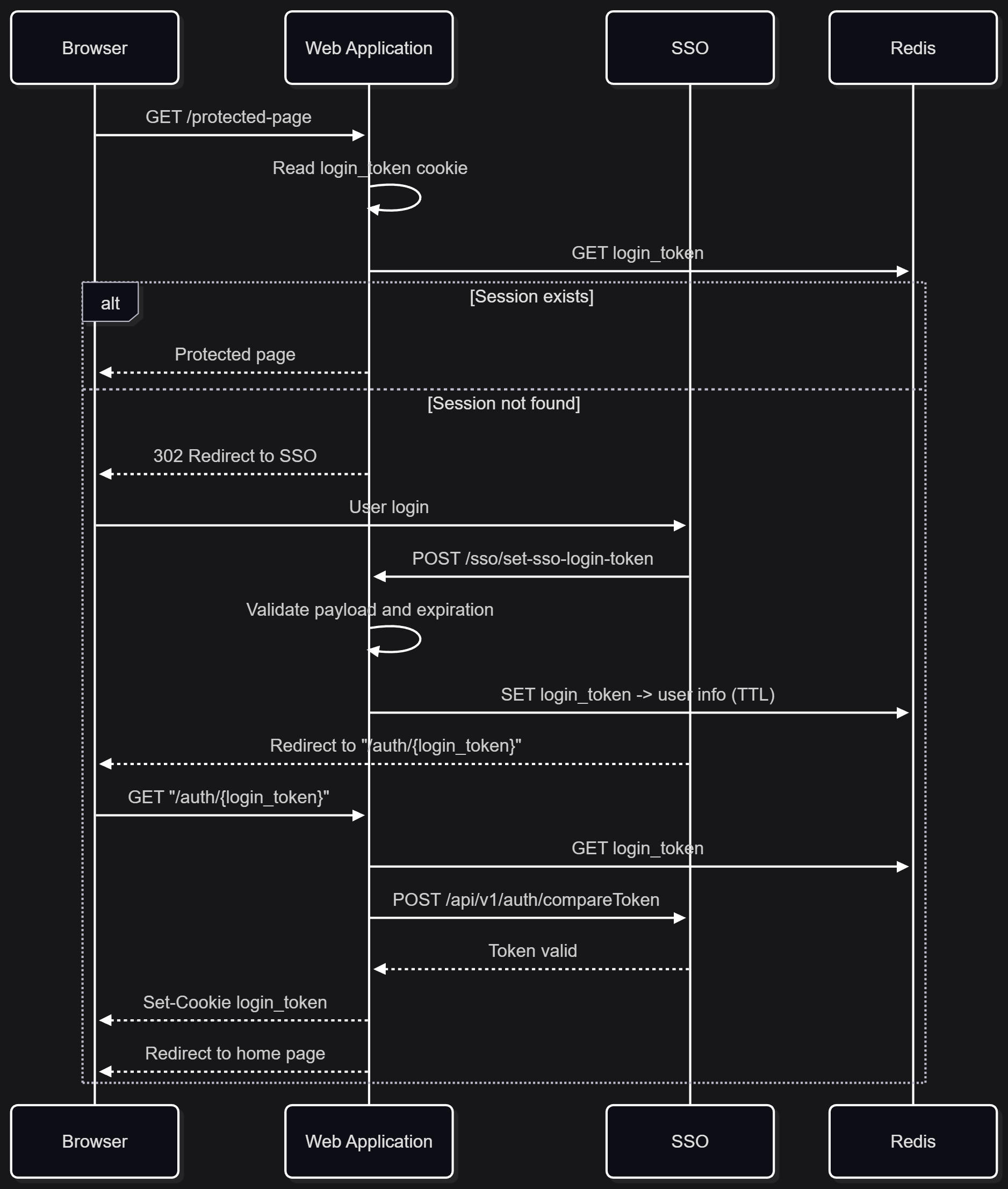
Contract Between SSO and Web Application
The web application and the SSO service must agree on:
- public URL of the web application;
- callback URL where the SSO sends login data;
- return URL used by the browser after login;
- payload format;
- method used to validate an already issued token;
- maximum session lifetime;
- roles, groups, or claims to transfer, if any.
A minimal payload can be:
{
"email": "user@example.com",
"loginToken": "opaque-session-token",
"token": "jwt-or-sso-token",
"exp": 1767225600
}
Recommended Endpoints
`POST /sso/set-sso-login-token`
Endpoint called by the SSO service, not by the browser.
Responsibilities:
- receive `email`, `loginToken`, `token`, and expiration;
- validate that all required fields are present;
- verify that the token is not expired;
- optionally decode the token payload to check consistency between the declared
`email` and the `email` contained in the token;
- store a serialized structure in Redis with email, login token, SSO token, and
expiration;
- set the Redis TTL to the same expiration as the SSO token.
Security note: if the token is a JWT, decoding it does not replace
cryptographic signature verification. If the web application does not have the
SSO public keys, it must at least validate the token by calling an SSO endpoint
before treating it as trustworthy.
`GET /auth/{token}`
Endpoint called by the browser after the SSO login.
Responsibilities:
- read `{token}` from the URL;
- retrieve the associated session from Redis;
- call the SSO service to validate that the SSO token is still valid;
- set an HttpOnly application cookie, for example `login_token`;
- redirect the user to the web application's home page.
- `httponly=True`;
- `secure=True` over HTTPS;
- `samesite="lax"` if compatible with the SSO flow;
- `max_age` or `expires` aligned with the token expiration.
Authentication Dependency or Middleware
Every protected endpoint should depend on a shared function that:
- reads the `login_token` cookie;
- looks up the token in Redis;
- deserializes the user information;
- redirects to the SSO service if no valid session is found;
- returns the user identity if the session is valid.
In FastAPI, the typical pattern is:
LoginToken = Annotated[str | None, Cookie()]
def get_user(login_token: LoginToken) -> str:
user = get_login(login_token)
if user is None:
redirect_to_sso()
return user.email
UserIdentity = Annotated[str, Depends(get_user)]
Protected endpoints receive `user: UserIdentity` and do not handle cookies,
Redis, or redirects directly.
Session Data Model
The application session should contain only minimal data:
class UserLoginInfo(BaseModel):
email: str
login_token: str
token: str
exp_datetime: datetime
Avoid storing unnecessary sensitive data in Redis. If roles or groups are
needed, store them only if they are required by the web application and if their
expiration is aligned with the SSO session.
Redis
Redis is used as a session store. The web application must not treat it as
permanent storage.
Operational rules:
- key: opaque login token;
- value: session JSON;
- expiration: `expireat(login_token, exp_datetime)`;
- if Redis loses the key, the user must log in again through SSO;
- keys should not contain email addresses or personal data unless strictly
necessary.
Logout
Logout can be handled at two levels:
Application logout
- delete the `login_token` cookie;
- delete the Redis key;
- redirect to a public page or to the SSO service.
SSO logout
- call the SSO service to invalidate the central session;
- then delete the local cookie and Redis session.
If the SSO service does not expose centralized logout, the web application can
still invalidate its local session.
Authentication and authorization must remain separate.
The SSO system answers: "Who is the user?"
The web application answers: "What can this user do?"
Application permissions can live in a database, in configuration, or in SSO
claims. For RPA web applications with process-specific permissions, it is often
clearer to keep an application permission table based on the authenticated
email.
Examples:
- `admin_required(user)`;
- `owner_required(user, resource_id)`;
- `can_execute_process(user, process_id)`.
Environment Variables
Recommended minimum configuration:
APP_SSO_BASE_URL=https://sso.example.com
APP_REDIS_HOST=redis
APP_REDIS_PORT=6379
APP_REDIS_DB=0
APP_REDIS_PASSWORD=
In real projects, use an application-specific prefix, for example
`MYAPP_SSO_BASE_URL`, and centralize environment loading in `config.py`.
Error Handling
Handle these cases explicitly:
- missing token: redirect to SSO;
- missing Redis session: redirect to SSO;
- expired token: delete the local session and redirect to SSO;
- failed SSO validation: `401 Unauthorized` or redirect to SSO;
- unreachable SSO service: `503 Service Unavailable` or an operational error
page;
- incomplete payload: `400 Bad Request` for the SSO callback;
- email/token mismatch: `400 Bad Request` or `401 Unauthorized`.
Never return sensitive tokens or payloads in logs or HTTP responses.
Implementation Checklist
1. Define `config.py` with SSO URL and Redis configuration.
2. Create a `UserLoginInfo` model.
3. Implement `get_redis_client()`.
4. Implement `POST /sso/set-sso-login-token`.
5. Implement `GET /auth/{token}`.
6. Implement `get_login(login_token)`.
7. Implement a `get_user` dependency.
8. Apply `Depends(get_user)` to all protected routes.
9. Configure HttpOnly/Secure/SameSite cookies.
10. Configure the reverse proxy with forwarded headers.
11. Add local logout.
12. Test token expiration, missing Redis session, invalid token, and redirect.
Security Notes
- Never log SSO tokens, login tokens, or cookies.
- Do not store application passwords.
- Use HTTPS in all exposed environments.
- Restrict `forwarded-allow-ips` to reverse proxy IP addresses.
- Do not trust decoded JWT claims without signature verification.
- Align Redis TTL, cookie expiration, and token expiration.
- Prefer opaque tokens as Redis keys.
- Use a secret manager or vault for Redis credentials and sensitive
configuration.
No comments to display
No comments to display